
HISM CONVERTER & MANAGER (UE 5.7+)
The Ultimate Optimization Suite for Unreal Engine
The Ultimate Optimization Suite for Unreal Engine
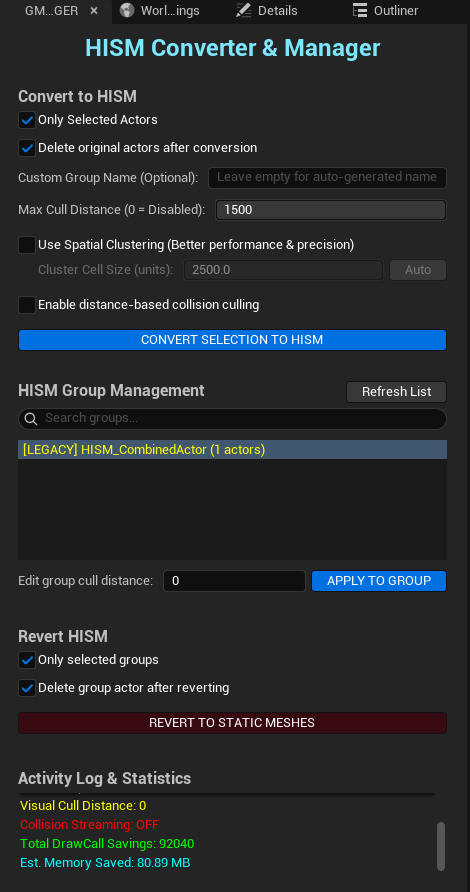
Only Selected Actors: Process only your current selection.
Delete Original Actors: Automatic level cleanup after successful
conversion.
Custom Group Name: Organize your assets by category (e.g.,
"Forest_Vegetation").
Max Cull Distance: Controls the distance at which instances are culled (0 =
disabled).
Divide large groups into Spatial Cells. Optimizes Unreal's native culling. Auto mode calculates the ideal cell size based on instance density.
Collision Distance: Physically unregisters collisions at long distances to save substantial CPU cycles in complex simulations.
Initiates the asynchronous conversion process. Reduce thousands of Draw Calls to just a few in seconds without freezing the editor.
Interactive dashboard. Automatically detects [LEGACY] assets (yellow) and allows real-time distance updates without re-conversion.
Restore individual Static Meshes. Now includes safety protection against accidental "mass reversion" of the entire level.
HISM Manager ready.
Monitor real-time Draw Call savings, optimized RAM estimation, and technical diagnostic
messages for total scene control.
Intelligent system that detects if the project requires compatibility rules (CoreRedirects) and applies them automatically on startup.
Hierarchical Instanced Static Meshes (HISM) are Unreal Engine's primary solution for rendering thousands of identical objects with optimal performance. Instead of having 1,000 separate tree actors (1,000 Draw Calls), HISM batches them into a single component (1 Draw Call), drastically reducing CPU and GPU overhead while maintaining per-instance LODs.
Problem: 5,000 rocks = 5,000 Draw Calls.
HISM Solution: 5,000 rocks = 1-5 Draw Calls.
Impact: FPS from 30 → 60+ in dense scenes.
Automatically partitions instances into clusters for superior Occlusion Culling. Only render what is truly relevant to the camera frustum.
Intelligently registers/unregisters collisions based on player distance. **Massive CPU savings** in physics-heavy environments.
Automatically detects **Dedicated Servers** and preserves critical collisions to ensure physics synchronization between client and server.
Our streaming logic can **unregister components** entirely to free up RAM/VRAM in massive open-world scenarios.
Backward compatible. Restore any group into individual Static Meshes at any time for surgical level editing.
• 8,000 trees (5 different types)
• 15,000 rocks (3 sizes)
• 3,000 decorative bushes
• Total: 26,000 actors = 26,000 Draw Calls
• FPS: 25-30 on mid-range hardware
"Forest_Pines"10000 (10km)Auto• Draw Calls: 26,000 → ~15 (per unique mesh profile)
• FPS: 25-30 → 60+ on same hardware configuration
• Memory: Distant clusters are dynamically streamed/unregistered
• Implementation Time: ~10 minutes for full level optimization
• Non-Destructive: Revert any group at any time to resume manual editing